LeadBoxer Platform: API-First Company Identification For Website And Product Traffic
Turn anonymous website and in-app traffic into enriched company accounts, scores, and CRM-ready signals via APIs and webhooks.

Most B2B traffic is anonymous, and that means sales, marketing, and product teams miss buying signals. LeadBoxer fixes that by turning web visits and in-app activity into company-level records sent through APIs, webhooks, and tool integrations.
Here’s the short version:
I can track website sessions, pageviews, clicks, forms, and downloads
I can match some visits to companies through IP-based identification, often in about 3 seconds
I can add firmographic data like industry, employee count, revenue range, and location
I can combine web activity + product usage into one account record
I can score accounts based on fit and intent
I can send those records into CRMs, marketing tools, BI systems, and internal workflows
That matters because a pricing-page visit from a 500-employee SaaS company is not the same as a blog visit from a random user. Without company data, both can look similar in analytics. With LeadBoxer, teams get a cleaner way to spot high-intent accounts, flag product-qualified leads, and trigger follow-up without manual exports.
At a glance, the platform follows a simple flow:
Collect web and product events
Identify the company when possible
Add firmographic data
Score account interest and fit
Send the output where teams already work
In other words, I’d describe LeadBoxer as a system for turning anonymous traffic into usable account signals.
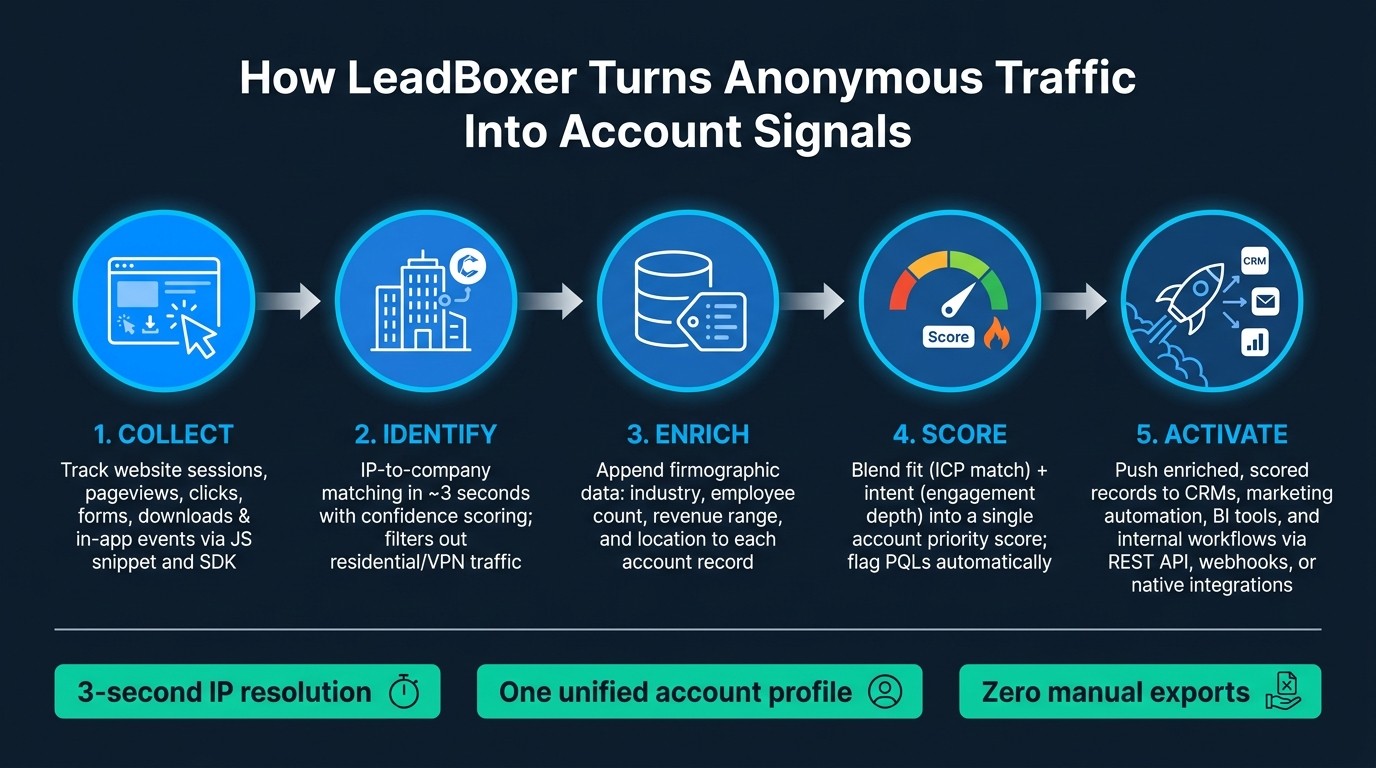
How LeadBoxer Turns Anonymous Traffic Into Account Signals
How LeadBoxer Identifies Companies From Website Traffic
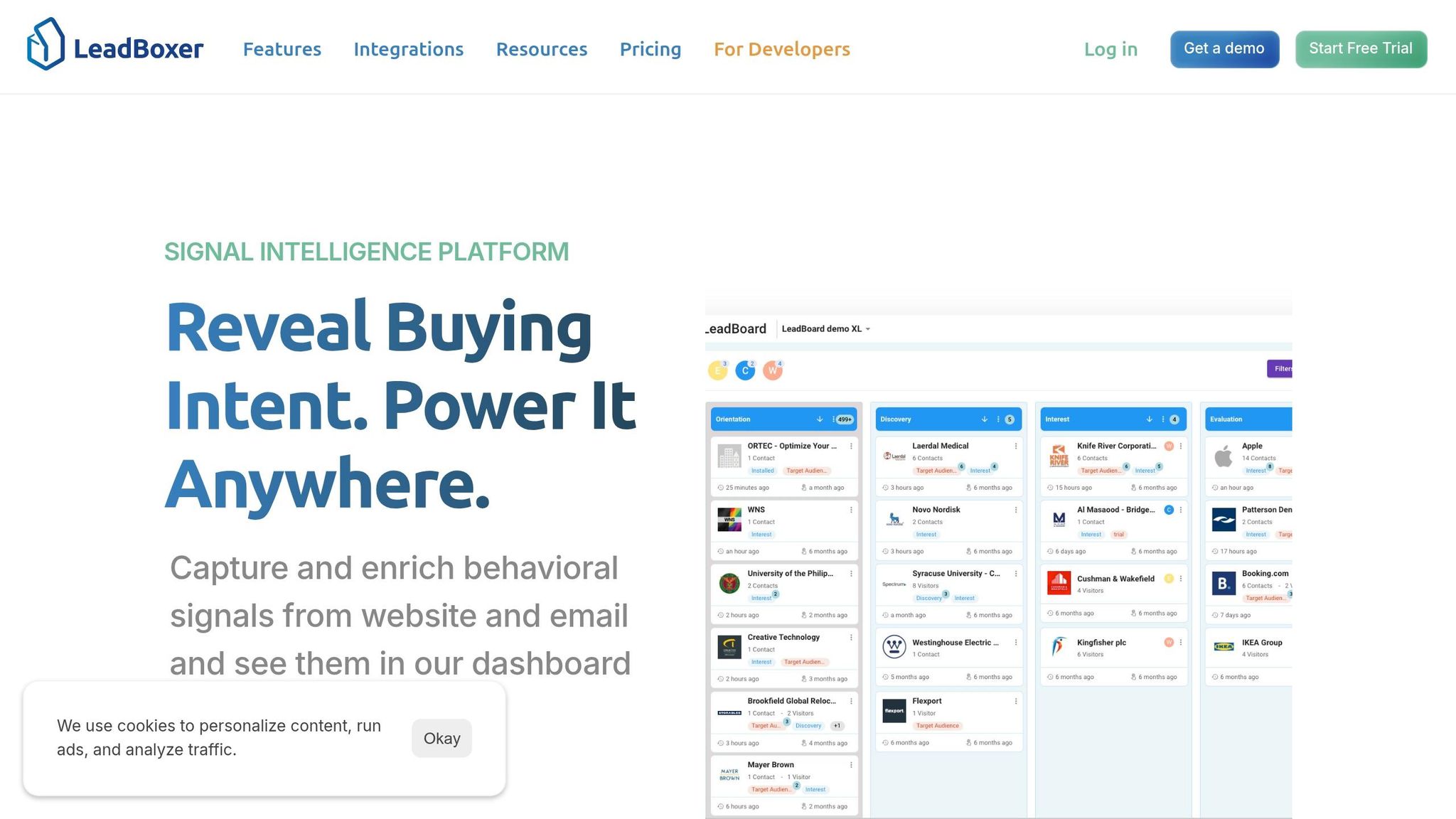
Tracking Scripts, Sessions, and Page-Level Behavior
LeadBoxer starts with a lightweight JavaScript snippet placed near the top of your site's <head> tag. After it's installed, it automatically tracks users, sessions, and events like pageviews, clicks, and time on page for every visit where the script is active. It can also track file downloads and form interactions.
Each new visitor gets a unique User ID stored in a first-party cookie. That ID stays in place across sessions, so when the same browser comes back later, LeadBoxer ties those visits to one profile instead of splitting them into separate anonymous sessions. That matters because session depth and repeat visits can show account-level interest. In plain terms, you start to see which companies are just passing through and which ones keep coming back.
IP-to-Company Matching and Account Identification
Once tracking is live, LeadBoxer resolves visits to companies through IP matching.
LeadBoxer resolves IPs in near real time, usually within 3 seconds of page load. It matches IPs against a company database and filters out residential or generic ISP traffic.
Each match comes with a confidence score, which gives teams a way to set thresholds before any automated action kicks in. For example, a high-confidence match on a known enterprise IP can go straight to sales, while a lower-confidence match can wait for a second look. The result includes the company's domain, company name, and the behavior tied to that visit.
Not every visitor can be tied to a business. If someone is browsing on a VPN or another non-corporate connection, the visit may not resolve to a company. When that happens, LeadBoxer still keeps the session as anonymous traffic, so the behavior isn't lost and can still be reviewed later.
Firmographic Enrichment for Identified Website Accounts
After a company is identified, LeadBoxer adds firmographic data to that record. These fields include industry, employee count, revenue range, and location, and they come back in the same API response.
This is where raw traffic data starts to become useful for lead targeting. A visit from a small startup and a visit from a large enterprise can look almost the same if you're only staring at session data. Firmographic enrichment helps teams sort those accounts faster, so they can focus on the ones that fit their target profile and spend less time on the rest.
Those enriched fields can also move into downstream tools. Marketing teams can use industry to trigger segment-based email automation. Sales ops teams can write employee count and revenue range into CRM records to support scoring, routing, and account prioritization. Because enrichment happens automatically, identification can flow straight into account updates. Those same enriched account records can then support in-product identification and qualification.
How LeadBoxer Extends Identification Into Product Usage
Capturing In-App Events and User Activity
LeadBoxer carries the same account logic into product activity, so teams can see what users do after they arrive. In plain English, it takes the identification layer used on the website and applies that same account model inside the product.
LeadBoxer records in-app events through its JavaScript SDK and server-side Track API. That gives product teams a way to instrument the actions that point to intent. A front-end event like OTLogService.sendEvent(name, map) can log core actions such as feature use or onboarding completion. Server-side calls cover backend signals like subscription changes, API key generation, or billing triggers that never hit the browser. Each event payload can include identifiers such as user ID, account ID, session ID, timestamp, and metadata like plan tier or feature name.
The most useful events usually line up with clear workflow stages. For example:
First login and onboarding completion point to activation
Teammate invitations and workspace creation point to collaboration
Repeated use of a core feature or integration setup points to retention and expansion readiness
That turns in-app behavior into account-level intelligence instead of a pile of isolated clicks. And those events mean even more once LeadBoxer rolls them up to the account level.
Aggregating Users, Sessions, and Accounts
Single events don’t tell you much on their own. The value comes from seeing the full picture. LeadBoxer structures product data in a hierarchy where events connect to sessions, sessions connect to users, and users connect to a company account. That helps product teams understand what an organization is doing, not just what one person clicked.
This matters a lot when several people from the same company use the product at different times. Without account-level aggregation, a PLG team might see three separate trial users and treat them like three unrelated signals. With aggregation, they see one account with three active seats, shared feature use, and a pattern of repeat logins. That’s a very different read.
Properties attached to events, such as plan_type = trial or stage = evaluation, can flow up into the parent session and user profile. That keeps account records current without manual updates and helps scoring logic reflect the latest activity. Once activity is grouped by account, it can support PQL scoring and routing.
Using Product Behavior to Identify Product-Qualified Leads
A single login doesn’t make a product-qualified lead. A stronger signal comes from a mix of behaviors: an account that has completed onboarding, has multiple active users, has used a core feature several times, and has crossed the usage threshold your team sets. LeadBoxer lets teams set account thresholds and flag PQLs automatically.
Take a simple example. A trial account with three active users, completed setup, five uses of a key feature, and a connected integration is a much stronger PQL signal than an account with one login and no follow-up activity. Once that threshold is crossed, LeadBoxer can push the enriched account record, including firmographics like employee count and industry, to a CRM or trigger an internal alert for sales follow-up.
The same event stream can support product adoption tracking, sales prioritization, and expansion alerts.
How LeadBoxer Enriches, Scores, and Delivers Signals Through APIs
Combining Firmographics With Intent and Engagement Signals
Once LeadBoxer identifies the account, the next move is simple: turn that signal into something a team can act on.
LeadBoxer enriches the account with firmographic data and pulls web and product activity into one timeline. It does this through IP and domain matching, plus enriched data sources.
Those signals then feed scoring logic that blends fit and intent. Fit shows how closely an account matches your ICP. Intent shows how strong the engagement is. In practice, teams often score accounts on both, then send the highest-priority ones to sales first.
Here’s the difference in plain terms: a U.S.-based SaaS company with 500 employees that keeps visiting the pricing page and completes a trial setup will score very differently from a one-time anonymous visit. Event properties roll up to the account record automatically, so scores stay current without manual updates.
Sending Structured Data to CRMs, Automation Tools, and Internal Dashboards
LeadBoxer exposes enriched, scored account data through REST APIs, webhooks, and native integrations and connectors in structured JSON with consistent field names. That makes it much easier to pass the same data across tools without turning it into a mess.
Teams can send that data into:
CRM account records
Marketing automation platforms for trigger-based campaigns
BI tools and data warehouses for reporting and analysis
That same structure also supports automated routing and prioritization in day-to-day work.
Practical Examples: Routing, Alerts, and Account Prioritization
A concrete end-to-end flow makes this easier to see.
A U.S.-based software company with 500 employees visits the website multiple times, views the pricing page, and signs up for a trial. LeadBoxer identifies the company from IP and domain, enriches the record with firmographic data, and aggregates web and product events into a single account profile. The scoring model assigns a high fit score and a high intent score, which pushes the overall score above the high-priority threshold.
From there, LeadBoxer triggers CRM updates, account assignment, alerts, and warehouse syncs automatically. Every one of those actions happens programmatically. No one had to export a spreadsheet by hand.
Conclusion: A Clear Framework for Turning Traffic Into Account Signals
LeadBoxer turns anonymous web and product activity into company-level signals through one API-first workflow: capture, identify, enrich, score, activate. The big win is simple: web and product activity feed into one account profile, firmographic data adds context, and engagement plus intent scores help teams sort accounts that are ready to act from the ones that aren’t.
That creates account signals that can move straight into CRMs, marketing automation, dashboards, and product workflows. And that’s how identification turns into action.
Key Takeaways for SaaS, Developer, and Product Teams
LeadBoxer gives sales, marketing, product, and engineering teams one account-level data layer without the need to build custom infrastructure.
For SaaS and go-to-market teams, that means cleaner lead qualification, better account prioritization, and faster follow-up when high-intent signals show up. For developer and product teams, it means a flexible API layer that fits into current pipelines and supports product-led workflows. Identification can happen out of the box based on IP addresses, form fields, and email, so teams can get from setup to signal fast.
FAQs
How accurate is company identification?
LeadBoxer delivers high company identification accuracy by matching visitor IP addresses with business registries and filtering out non-business traffic, such as ISPs, hosting services, telecoms, mobile networks, and VPNs.
For IP-based lookups, it also provides a confidence score. Teams can improve accuracy even more by combining IP data with form submissions and email link tracking.
Can I connect website and product activity to one account?
Yes. LeadBoxer can connect website and product activity to the same account.
It does this by identifying the company behind each visit through IP lookup, identification, and/or session identifiers. From there, it pulls that activity into a single lead object with firmographic company data and an account-level timeline.
In plain English: website visits and product usage don’t have to live in separate buckets. LeadBoxer ties them back to the same identified company, so the full picture shows up in one place.
That also helps stitch sessions across devices or locations, so website and product engagement roll up to the same account.
What tools can receive LeadBoxer data?
LeadBoxer data can be sent to tools that support sales, marketing, and product work.
That includes CRMs like Salesforce, HubSpot, and Pipedrive, where it can sync lead records and automate account updates.
It can also flow into internal dashboards, BI tools, and automated workflows through webhooks or platforms like Zapier, Make, and n8n.
For teams that need more control, developers can use REST APIs in SaaS products, custom apps, or data pipelines.
Related Blog Posts
Build on the LeadBoxer Platform
APIs for tracking, company identification, enrichment and scoring. The first 25,000 credits are free.